This is a documentation for Board Game Arena: play board games online !
Gamehelpparks: Difference between revisions
No edit summary |
Sammy McSam (talk | contribs) 2nd edition icons |
||
| (16 intermediate revisions by 9 users not shown) | |||
| Line 1: | Line 1: | ||
== | == Overview == | ||
Parks is played over the course of 3 rounds called Seasons. Each Season, your two Hikers {{parksHiker}} will make their way down the Trail, stopping at Trail Sites along the way, collecting Resources {{parksResource}} to visit Parks, taking Photos {{ParksPhoto}} of the beautiful vistas, and encountering Wildlife {{parksWildlife}} (from a safe distance). Along the way, you’ll gain Gear {{parksGearDeck}} and Canteens {{parksCanteen}} to improve your hiking experience. Once all Hikers reach Trail’s End, it’s time to set up for the next Season. At the end of the third Season, the hike (and the game) is over! Count up your points and see who enjoyed the parks the most. | |||
== | == Starting a Season == | ||
==== Trail Site Tiles ==== | |||
{{parksSiteForest}}{{parksSiteMountain}}{{parksSiteSun}}{{parksSiteWater}}{{parksSiteWildlife}}{{parksSitePark}}{{parksSiteCanteenPhoto}}{{parksSiteGear}}{{parksSiteDie}} | |||
Shuffle the 8 Trail Site Tiles and randomly place them face up on top of each empty Trail Site. | |||
== | ==== Weather {{parksWeather}} ==== | ||
Beginning with the 2nd Trail Site, place a Weather Token at each site, alternating between {{parksSun}} and {{parksWater}}. | |||
==== Shutterbug Token {{parksShutterbug}} ==== | |||
Roll the Trail Die {{d6|ParksDie.jpg|54|S=27|r=4|l=3|bk=5|bkR=2|Rx=-30|Ry=-20}} and place the Shutterbug {{parksShutterbug}} underneath the matching Trail Site. | |||
Place the Shutterbug Badge {{parksShutterbugBadge}} off to the side of the board, within reach of all players. | |||
== Taking turns == | |||
== | === Hiking {{parksHiker}} === | ||
To begin each Season , the player with the First Hiker Token {{parksFirstHiker}} moves one of their {{parksHiker}} as far as they want down the Trail, stopping at a Trail Site and taking the Trail Site action. Then, each player in clockwise order moves one of their {{parksHiker}} any number of spaces down the Trail, stopping at a Trail Site and taking a Trail Site action, which will include gaining Resources {{parksResource}}, taking Photos {{parksPhoto}}, visiting Parks, and more. Play continues around the table, with each player selecting one of their two {{parksHiker}} and moving it down the Trail. There is no backtracking. Each {{parksHiker}} must always move from left to right, towards the Trail’s End. Eventually, you’ll move both your {{parksHiker}} to Trail’s End, the last space on the Trail. Once a {{parksHiker}} reaches Trail’s End, it stays there for the rest of the Season. | |||
==== Campfires {{parksCampfire}} ==== | |||
Sometimes, you’ll want one of your {{parksHiker}} to stop at a Trail Site occupied by another Hiker. To share a site with another Hiker (including your own), extinguish your Campfire {{parksCampfire}}, flipping it face-down near your Player Board. | |||
* '''Note''': For 1-3 players your {{parksCampfire}} starts the game extinguished. | |||
==== Trail Site Actions ==== | |||
A big part of your journey will be spent visiting Trail Sites. Here are all the Trail Sites in Parks and the action you take at that site: | |||
*{{parksSiteForest}} Gain a Forest | |||
*{{parksSiteMountain}} Gain a Mountain | |||
*{{parksSiteSun}} Gain 2 Sun | |||
*{{parksSiteWater}} Gain 2 Water | |||
*{{parksSiteDie}} Roll the Trail Die {{d6|ParksDie.jpg|54|S=27|r=4|l=3|bk=5|bkR=2|Rx=-30|Ry=-20}} and gain the face value | |||
*{{parksSiteGear}} Purchase Gear | |||
*{{parksSiteCanteenPhoto}} Gain a Canteen {{parksCanteen}} or take a Photo {{parksPhoto}} | |||
*{{parksSiteWildlife}} Trade {{parksResource|1}} for {{parksWildlife|1}} | |||
*{{parksSitePark}} Reserve a Park or visit many Parks | |||
===== Wildlife {{parksWildlife}} ===== | |||
Wildlife are wild, appearing all over the game! They can be used in place of any other {{parksResource}} to visit Parks, purchase Gear, and take Photos. ''Note: they cannot be used to fill a Canteen'' | |||
===== Parks {{parksDeck}} ===== | |||
Visiting Parks is what we’re here for, and it’s the best way to earn points in the game. Whenever you encounter the icon in the middle of the Trail or at Trail’s End, you can either reserve a Park, or visit one or more Parks. Whenever reserving or visiting Parks, replace cards in the display after your turn has completely ended. | |||
* '''Reserve A Park''': Choose 1 Park Card from the display or draw the top {{parksDeck}} from the deck and add it to the Reserved Parks area on the left side of your Player Board. Parks you reserve are available for you to visit with a future Parks action. Only you can visit Parks in your Reserve. | |||
''The player with the most | * '''Visit Parks''': You can visit as many Parks as you’d like and are able to from the Parks Display and your personal Reserve. To visit Parks, trade {{parksResource}} from your Backpack matching the requirement on the {{parksDeck}} and place it in your visited Parks area on the right side of your Player Board. {{parksResource}} you spend are returned to the Resource Trays. Once you are done visiting Parks for your turn, slide {{parksDeck}} in the display to the right to fill the gap. Then refill on the left with cards drawn from the {{parksDeck}} Deck. | ||
* '''Instant Action Parks''': Parks with a symbol have instant actions or benefits, which you’ll immediately gain when you visit the Park. These benefits include: | |||
** {{parksCanteen}} / {{parksShutterbugBadge}} / rolling {{d6|ParksDie.jpg|54|S=27|r=4|l=3|bk=5|bkR=2|Rx=-30|Ry=-20}}. | |||
===== Photos {{parksPhoto}} ===== | |||
Photos are another great way to earn points. To take a {{parksPhoto}}, trade {{parksResource|1}} from your Backpack for a {{parksPhoto}} in the Resource Tray—worth 1 point each—that you’ll place above your Player Board. When one of your {{parksHiker}} lands on the Trail Site with the {{parksShutterbug}}, gain the {{parksShutterbugBadge}} in addition to the other benefits of that site. If it has already been gained by another player, take it from them. Leave the {{parksShutterbug}} on the Trail for others to encounter all Season long. | |||
* '''The Shutterbug Badge''': If you take a {{parksPhoto}} while you have the {{parksShutterbugBadge}}, once per turn, you may spend an additional {{parksResource}} to take a second {{parksPhoto}}. | |||
* The player with the most {{parksPhoto}} at the end of the game earns the Photo Bonus Tile. | |||
===== Canteens {{parksCanteen}} ===== | |||
* '''Gaining a Canteen:''' It gets hot out there on the Trail, and filling your Canteen will give you lots of benefits in addition to keeping you hydrated. You have three Canteen rows on your Player Board, each of which can hold two {{parksCanteen}} with space for {{parksWater}} between them. Choose one of the three available {{parksCanteen}} or take the top token from the Canteen stack and place it in any empty space in the Canteen area on your Player Board. If you took one from the display, draw a token to replace it. | |||
* '''Using a Canteen:''' Whenever you gain a {{parksWater}}, you choose whether you want to add it to your Backpack or place it in a Canteen to gain the benefits from the tokens in that row. {{parksWater}} in your Backpack cannot be used later to fill a Canteen. Each row may be activated with {{parksWater}} once per Season. You can activate a Canteen row with only one token in it. If you add a {{parksCanteen}} to a row after it has {{parksWater}} in it, you do not gain the benefit that Season. | |||
===== Gear Cards {{parksGearDeck}} ===== | |||
If you want to go the distance, you’re going to need a good pair of boots. Having Gear packed in your bag will set you up for greater rewards when you visit Trail Sites and take other actions in the game. Grab Gear as early as you can to enjoy its benefits during your hike. | |||
====== Purchasing Gear ====== | |||
When you purchase Gear, you may buy one {{parksGearDeck}}. Choose one of the two ways to purchase Gear: | |||
* Spend {{parksSun}} equal to a {{parksGearDeck}} cost in the Gear Market (in the upper right). Then place the purchased {{parksGearDeck}} below the Gear area of your Player Board. | |||
* Spend {{parksSun}}{{parksSun}} to draw the top card of the Gear Deck and place it below the Gear area of your Player Board. | |||
''If you purchased a card from the Gear Market on your turn, slide the remaining {{parksGearDeck}} to the right, and refill on the left by drawing {{parksGearDeck}}.'' | |||
====== Using Gear ====== | |||
* Gear you buy is ready to use immediately. Gear may activate when you visit a Trail Site or when you take a specific action. Gear is active while hiking and between Seasons. | |||
* It is possible to gain the benefit of multiple Gear on your turn. Gear benefits may be gained in any order after you take your Trail Site action. | |||
''Gear benefits may be gained only one time per turn.'' | |||
===== Rolling the Trail Die {{d6|ParksDie.jpg|54|S=27|r=4|l=3|bk=5|bkR=2|Rx=-30|Ry=-20}} ===== | |||
Life on the Trail can sometimes be unpredictable—you never know what Mother Nature is going to throw your way. When you land on the Trail Site or encounter on a Park, Gear, or Passion Card, roll and gain the face value: | |||
{{parksForest}} / {{parksMountain}} / {{parksSun}}{{parksSun}} / {{parksWater}}{{parksWater}} / {{parksWildlife}} / {{parksCanteen}} | |||
==== Passion Cards ==== | |||
You love the great outdoors, but that’s not the only reason you’re on the trail. Explore your Passion to enjoy the Parks in new and unique ways. Each Passion Card has an objective on one side. Start with the objective face up. You will complete the objective on your turn by taking specific actions. As soon as you complete your Passion’s requirement, flip it over and choose either: | |||
*→ Gear Effect will give you a unique Gear ability for the rest of the game. | |||
*→ End Game Bonus will give you a unique scoring bonus at the end of the game. | |||
Indicate your chosen bonus by tucking your Passion Card under your Player Board so that only the chosen bonus is visible. | |||
''It is possible that completing your Passion in the middle of your turn will earn you a benefit for another action in the same turn.'' | |||
== Trail End == | |||
When you move a {{parksHiker}} to the Trail End, choose one of the three spaces to place your {{parksHiker}}. | |||
* Note: Any number of Hikers can be on each space. | |||
* Note: Your {{parksCampfire}} is '''not''' relighted when your first {{parksHiker}} reaches the end. | |||
==== Take a Parks Action ==== | |||
* Reserve a park | |||
* Visit Parks | |||
* The first player who uses this space each season takes the First Hiker Token {{parksFirstHiker}} | |||
==== Take a Photo {{parksPhoto}} ==== | |||
The first player who uses this space each season gains a {{parksWildlife}}. ''The player with the {{parksShutterbug}} may do this action twice.'' | |||
==== Buy Gear {{parksGearDeck}} ==== | |||
The first player who uses this space each season gains a {{parksSun}}. | |||
== End of a Season == | |||
* Once both a player’s two {{parksHiker}} reach the Trail End, they will no longer take turns for the Season. | |||
* When only one player has a {{parksHiker}} left on the Trail, they must move each {{parksHiker}} directly to the Trail End on their next turn and choose a Trail End action for each {{parksHiker}} moved. Then it is the end of the Season. | |||
# '''Season Scoring:''' Award the Season Bonus. Then, if it’s the end of Spring or Summer, flip over the Season Tile. | |||
# '''Player Steps:''' | |||
## Empty your Canteens by discarding all {{parksWater}} from your Canteens back to the Resource Tray. | |||
## Relight your {{parksCampfire}} if it’s been extinguished, flipping it face up. | |||
## Return all {{parksHiker}} to the Trailhead. | |||
# '''Trail Steps:''' | |||
## Reshuffle the Trail Sites and randomly place them back out on the Trail face up. | |||
## Add new {{parksWeather}} to the Trail, beginning at the 2nd Trail Site, alternating {{parksSun}} and {{parksWater}} on each site. | |||
## Roll {{d6|ParksDie.jpg|54|S=27|r=4|l=3|bk=5|bkR=2|Rx=-30|Ry=-20}} and place the {{parksShutterbug}} under the corresponding Trail Site. | |||
## Discard the rightmost {{parksGearDeck}} from the Gear Market back to the box. Slide the remaining {{parksGearDeck}} one spot to the right and draw a new {{parksGearDeck}}. | |||
== Game End == | |||
After the 3rd Season, It’s time to reflect on the peaks and valleys: | |||
# '''Award the Season Bonus''' Determine who earned the Fall Season Bonus and award them the points. In the case of a tie, all tied players receive the points. | |||
# '''Score Visited Parks''' Total the points across all your visited Parks. | |||
# '''Score Photos''' The player who took the most {{parksPhoto}} gets the Photo Bonus, scoring: | |||
## 3 points in a 2-player game | |||
## 4 points in a 3–5-player game, with 2 points for the player with the 2nd-most Photos | |||
## Then, all players score 1 point per {{parksPhoto}} | |||
# '''Score Passion Cards''' If you chose the End Game Bonus on your Passion Card, score those points now. | |||
# '''First Hiker Token''' The player with the {{parksFirstHiker}} gains 1 point. | |||
The player with the most points wins! | |||
==== Tie Breaks ==== | |||
Most Parks, else shared victory. | |||
Latest revision as of 23:40, 10 June 2025
Overview
Parks is played over the course of 3 rounds called Seasons. Each Season, your two Hikers will make their way down the Trail, stopping at Trail Sites along the way, collecting Resources to visit Parks, taking Photos of the beautiful vistas, and encountering Wildlife (from a safe distance). Along the way, you’ll gain Gear and Canteens to improve your hiking experience. Once all Hikers reach Trail’s End, it’s time to set up for the next Season. At the end of the third Season, the hike (and the game) is over! Count up your points and see who enjoyed the parks the most.

Starting a Season
Trail Site Tiles
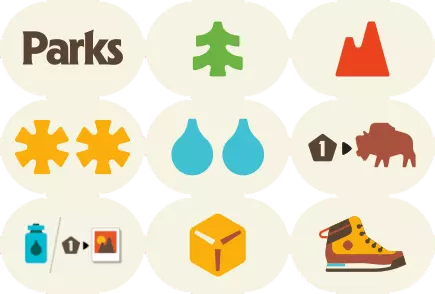
Shuffle the 8 Trail Site Tiles and randomly place them face up on top of each empty Trail Site.
Weather
Beginning with the 2nd Trail Site, place a Weather Token at each site, alternating between and .
Shutterbug Token
Roll the Trail Die and place the Shutterbug underneath the matching Trail Site. Place the Shutterbug Badge off to the side of the board, within reach of all players.


Taking turns
Hiking
To begin each Season , the player with the First Hiker Token moves one of their as far as they want down the Trail, stopping at a Trail Site and taking the Trail Site action. Then, each player in clockwise order moves one of their any number of spaces down the Trail, stopping at a Trail Site and taking a Trail Site action, which will include gaining Resources , taking Photos , visiting Parks, and more. Play continues around the table, with each player selecting one of their two and moving it down the Trail. There is no backtracking. Each must always move from left to right, towards the Trail’s End. Eventually, you’ll move both your to Trail’s End, the last space on the Trail. Once a reaches Trail’s End, it stays there for the rest of the Season.
Campfires
Sometimes, you’ll want one of your to stop at a Trail Site occupied by another Hiker. To share a site with another Hiker (including your own), extinguish your Campfire , flipping it face-down near your Player Board.
- Note: For 1-3 players your starts the game extinguished.
Trail Site Actions
A big part of your journey will be spent visiting Trail Sites. Here are all the Trail Sites in Parks and the action you take at that site:
- Gain a Forest
- Gain a Mountain
- Gain 2 Sun
- Gain 2 Water
- Roll the Trail Die and gain the face value
- Purchase Gear
- Gain a Canteen or take a Photo
- Trade 1 for
- Reserve a Park or visit many Parks
Wildlife
Wildlife are wild, appearing all over the game! They can be used in place of any other to visit Parks, purchase Gear, and take Photos. Note: they cannot be used to fill a Canteen
Parks
Visiting Parks is what we’re here for, and it’s the best way to earn points in the game. Whenever you encounter the icon in the middle of the Trail or at Trail’s End, you can either reserve a Park, or visit one or more Parks. Whenever reserving or visiting Parks, replace cards in the display after your turn has completely ended.
- Reserve A Park: Choose 1 Park Card from the display or draw the top from the deck and add it to the Reserved Parks area on the left side of your Player Board. Parks you reserve are available for you to visit with a future Parks action. Only you can visit Parks in your Reserve.
- Visit Parks: You can visit as many Parks as you’d like and are able to from the Parks Display and your personal Reserve. To visit Parks, trade from your Backpack matching the requirement on the and place it in your visited Parks area on the right side of your Player Board. you spend are returned to the Resource Trays. Once you are done visiting Parks for your turn, slide in the display to the right to fill the gap. Then refill on the left with cards drawn from the Deck.
- Instant Action Parks: Parks with a symbol have instant actions or benefits, which you’ll immediately gain when you visit the Park. These benefits include:
- / / rolling .
Photos
Photos are another great way to earn points. To take a , trade 1 from your Backpack for a in the Resource Tray—worth 1 point each—that you’ll place above your Player Board. When one of your lands on the Trail Site with the , gain the in addition to the other benefits of that site. If it has already been gained by another player, take it from them. Leave the on the Trail for others to encounter all Season long.
- The Shutterbug Badge: If you take a while you have the , once per turn, you may spend an additional to take a second .
- The player with the most at the end of the game earns the Photo Bonus Tile.
Canteens
- Gaining a Canteen: It gets hot out there on the Trail, and filling your Canteen will give you lots of benefits in addition to keeping you hydrated. You have three Canteen rows on your Player Board, each of which can hold two with space for between them. Choose one of the three available or take the top token from the Canteen stack and place it in any empty space in the Canteen area on your Player Board. If you took one from the display, draw a token to replace it.
- Using a Canteen: Whenever you gain a , you choose whether you want to add it to your Backpack or place it in a Canteen to gain the benefits from the tokens in that row. in your Backpack cannot be used later to fill a Canteen. Each row may be activated with once per Season. You can activate a Canteen row with only one token in it. If you add a to a row after it has in it, you do not gain the benefit that Season.
Gear Cards
If you want to go the distance, you’re going to need a good pair of boots. Having Gear packed in your bag will set you up for greater rewards when you visit Trail Sites and take other actions in the game. Grab Gear as early as you can to enjoy its benefits during your hike.
Purchasing Gear
When you purchase Gear, you may buy one . Choose one of the two ways to purchase Gear:
- Spend equal to a cost in the Gear Market (in the upper right). Then place the purchased below the Gear area of your Player Board.
- Spend to draw the top card of the Gear Deck and place it below the Gear area of your Player Board.
If you purchased a card from the Gear Market on your turn, slide the remaining to the right, and refill on the left by drawing .
Using Gear
- Gear you buy is ready to use immediately. Gear may activate when you visit a Trail Site or when you take a specific action. Gear is active while hiking and between Seasons.
- It is possible to gain the benefit of multiple Gear on your turn. Gear benefits may be gained in any order after you take your Trail Site action.
Gear benefits may be gained only one time per turn.
Rolling the Trail Die
Life on the Trail can sometimes be unpredictable—you never know what Mother Nature is going to throw your way. When you land on the Trail Site or encounter on a Park, Gear, or Passion Card, roll and gain the face value:
/ / / / /
Passion Cards
You love the great outdoors, but that’s not the only reason you’re on the trail. Explore your Passion to enjoy the Parks in new and unique ways. Each Passion Card has an objective on one side. Start with the objective face up. You will complete the objective on your turn by taking specific actions. As soon as you complete your Passion’s requirement, flip it over and choose either:
- → Gear Effect will give you a unique Gear ability for the rest of the game.
- → End Game Bonus will give you a unique scoring bonus at the end of the game.
Indicate your chosen bonus by tucking your Passion Card under your Player Board so that only the chosen bonus is visible.
It is possible that completing your Passion in the middle of your turn will earn you a benefit for another action in the same turn.
Trail End
When you move a to the Trail End, choose one of the three spaces to place your .
- Note: Any number of Hikers can be on each space.
- Note: Your is not relighted when your first reaches the end.
Take a Parks Action
- Reserve a park
- Visit Parks
- The first player who uses this space each season takes the First Hiker Token
Take a Photo
The first player who uses this space each season gains a . The player with the may do this action twice.
Buy Gear
The first player who uses this space each season gains a .
End of a Season
- Once both a player’s two reach the Trail End, they will no longer take turns for the Season.
- When only one player has a left on the Trail, they must move each directly to the Trail End on their next turn and choose a Trail End action for each moved. Then it is the end of the Season.
- Season Scoring: Award the Season Bonus. Then, if it’s the end of Spring or Summer, flip over the Season Tile.
- Player Steps:
- Empty your Canteens by discarding all from your Canteens back to the Resource Tray.
- Relight your if it’s been extinguished, flipping it face up.
- Return all to the Trailhead.
- Trail Steps:
- Reshuffle the Trail Sites and randomly place them back out on the Trail face up.
- Add new to the Trail, beginning at the 2nd Trail Site, alternating and on each site.
- Roll and place the under the corresponding Trail Site.
- Discard the rightmost from the Gear Market back to the box. Slide the remaining one spot to the right and draw a new .
Game End
After the 3rd Season, It’s time to reflect on the peaks and valleys:
- Award the Season Bonus Determine who earned the Fall Season Bonus and award them the points. In the case of a tie, all tied players receive the points.
- Score Visited Parks Total the points across all your visited Parks.
- Score Photos The player who took the most gets the Photo Bonus, scoring:
- 3 points in a 2-player game
- 4 points in a 3–5-player game, with 2 points for the player with the 2nd-most Photos
- Then, all players score 1 point per
- Score Passion Cards If you chose the End Game Bonus on your Passion Card, score those points now.
- First Hiker Token The player with the gains 1 point.
The player with the most points wins!
Tie Breaks
Most Parks, else shared victory.